|
If you have DirectSOFT v6.0 or later you
must use the Help-> Check For Updates
utility to get the latest update.
You do not need to
re-enter your product key during the installation of the update.
View the
Release 6 Revision history
|
|
If you have DirectSOFT5 Release v5.0,
v5.1 or v5.2, here's the latest service
pack.
You do not need to
re-enter your product key during the installation of the service pack.
DirectSOFT v5.3 Service Pack ( ~25Mb )
View the
Release 5 Revision history
View the DirectSOFT Release 5 Product Page
|
|
If you have DirectSOFT32 Release 4.0, here's the latest service
pack.
The installation product key is : DSP-SERVICE-PACK
DirectSOFT32 v4.0
(Build 25) Service Pack ( ~11.5Mb )
View the Release
4 Revision History
View the DirectSOFT Release 4 Product Page
|
|
If you have DirectSOFT32 Release 3.0, here's the latest service
pack
The product key is : DSP-SERVICE-PACK
DirectSOFT32
v3.0c
(Build 80) Service
Pack
View the Release 3 Revision
History
|
|
DirectSOFT v2.4a
Maintenance Release Jan '1999 (~3 Mb)
- This will upgrade any DirectSOFT Programming
Release 2.x to Release 2.4a. This maintenance release will NOT
work for DirectSOFT Release 1.x. This
is NOT a complete installation. You must have a previous 2.x release of
our DirectSOFT Programming installed to use
this maintenance release.
- DirectSOFT
v2.4a
DL350 Bit Override Jan '1999 (58 kb ) This download will
allow for proper operation of the new Bit Override feature in a Koyo
DL350 CPU. It consists of one file: ProtoKSQ.Dll, which simply replaces
the one currently in your '\Dirctsft\Bin' directory. This
download is only applicable to DirectSOFT
v2.4a.
|
|
|
|
If you have DSData Release Release 4.0, here's the latest service
pack.
The installation product key is : DSDATA-SERVICE-PACK
DSData
Server v4.0 (Build 25) Service Pack ( ~4Mb )
View the
Release 4.0 Revision history.
|
|
If you have DSData Release Release 3.0, here's the latest service
pack
The product key is : DSDATA-SERVICE-PACK
DSData
Server v3.0c (Build 80) Service Pack
View the
Release 3.0 Revision history.
|
|
We are no longer actively developing this
product. It is still
available for customers needing to upgrade.
If you have DDE Server Release 1.0, here's the latest service pack:
DDE
Server 1.7a Service Pack Jan
'1999 (~1.4mb )
|
|
|
|
Since LookoutDirect uses the same
communication server and element server as our DirectSOFT PLC
Programming software package, we have two different service packs that
you can download. The one you choose depends on whether you intend to
use it on a PC which also has DirectSOFT installed.
These downloads do not provide a true
upgrade, they are full installation packages, so you will need to use the same product
key that you used during your initial installation of LookoutDirect.
If your PC has DirectSOFT32
installed, you need this version:
LookoutDirect
v4.51.19 with v4.0 Comm Server - Build 25 ( ~22 Mb )
View the LookoutDirect
Revision History
After installing
this service pack, your copy of LookoutDirect will still appear as Build
4.15.19 (look in Help-> About). Use the Version utility in DSLaunch to
verify that the "DirectSOFT32 - Communications Server" components have
been updated to 4.0.025.
If your PC has DirectSOFT5
installed, you need this version:
LookoutDirect
v4.51.19 with v5.3 Comm Server - Build 105 ( 29.9 Mb )
View the LookoutDirect
Revision History
After installing
this service pack, your copy of LookoutDirect will still appear as Build
4.15.19 (look in Help-> About). Use the Version utility in DSLaunch to
verify that the "DirectSOFT5 - Communications Server" components have
been updated to 5.3.194.
|
|
If you have National
Instrument's Lookout Release 4.x,
here's the latest version of our DirectLOGIC Plus Driver for use with Lookout.
Since the DirectLOGIC Plus package uses the
same communication server and element server as our DirectSOFT PLC
Programming software package, we have two different service packs that
you can download. The one you choose depends on whether you intend to
use it on a PC which also has DirectSOFT installed.
These downloads do not provide a true
upgrade, they are full installation packages, so you will need to use the same product
key that you used during your initial installation of the DirectLOGIC Plus
software.
If your PC has DirectSOFT32
installed, you need this version:
DirectLOGIC
Plus
for Lookout v4.51.19 with v4 Comm Server ( ~3Mb)
View the
DirectLOGIC Plus
Revision History
If your PC has DirectSOFT5
installed, you need this version:
DirectLOGIC
Plus
for Lookout v4.51.19 with v5.3 Comm Server ( ~7Mb)
View the
DirectLOGIC Plus
Revision History
|
|
Demo Programs
|
|
There is no "real" demo for DirectSOFT6, instead we now have
DirectSOFT100 which gives you the same features as the full version of
DirectSOFT6 but allows only 100 Words of ladder code to be downloaded to
the PLC. DirectSOFT100 can program all of the
DL05/06/105/205/305/405 systems. A keycode is not required to
install DirectSOFT100.
DirectSOFT100
can be downloaded for free at
www.Automationdirect.com
Take a test drive of the DirectSOFT32
(v4.x) Programming for Windows! This is a limited use
version. Refer to the restrictions below:
- Can
Save Online / Monitor Status on a 10 Ladder-word program
(maximum) in the PLC.
- Can
Monitor Status on a maximum of 4 items in Data View.
- Can
have a maximum of 4 Data Views.
- Can
have only 1 Communication Link active at a time.
- Can
have only 1 Ladder (Stage, Mnemonic, XRef/Usage) View open at a time.
- Cannot
Save to Disk.
- Displays
a 'Nag Dialog' encouraging Customers to purchase the Full Version of
DirectSOFT-Programming!
The installation Product Key is: DSP-DEMO
DirectSOFT32
v4.0 (Build 25) Demo ( ~11.5 Mb )
|
You can now test drive our latest DDE / OPC
server software, DSData Server v4.0. This fully functional demo program
will operate for 30 minutes. If you have any questions about the
functionality of an application using DSData or about the speed of an
application using DSData, we heartily encourage you to download this demo
and try it out before you buy it.You
can only have one installation of the DSData Server on a PC. If you
install this DEMO on a PC that already has a version of DSData
installed, that existing version will be uninstalled - probably not
what you want to have happen!
The installation product key
is : DSDATA-DEMO
DSData
Server v4.0 (Build 25) Demo ( ~4Mb )
|
|
Take a test drive of the latest release of
LookoutDirect!
Since LookoutDirect uses the same
communication server and element server as our DirectSOFT PLC
Programming software package, we have two different versions of the demo
that you can download. The one you choose depends on whether you intend
to use it on a PC which also has DirectSOFT installed.
If your PC has DirectSOFT32
installed, you need this version:
LookoutDirect v4.51.19 Demo with v4
Comm Server ( 22Mb )
The installation Product Key for the demo is: LKD-DEMO
If your PC has DirectSOFT5
installed, you need this version:
LookoutDirect v4.51.19 Demo with
v5.3 Comm Server ( 24.3Mb )
The installation Product Key for the demo is: LKD-DEMO
|
|
|
|
CTRIO Workbench v2.2
Last Update : 17 April 2013
File Size : 7.20Mb
SetupCTR.Zip
View the CTRIO Workbench Revision History
Note: CTRIO Workbench is NOT
required to use the CTRIO or CTRIO2 modules with the
Do-more PLCs.
NOTES:
- If
you are using the CTRIO modules with AutomationDirect PLCs, you must have
DirectSOFT32 or DirectSOFT5 installed on the PC that will run CTRIO Workbench.
- If you're using DirectSOFT32 V3.0, you also must have Build 71 or
later installed, use this link to get the latest
DirectSOFT32 Service
Pack.
- If you are using the CTRIO modules with either
the T1K-MODBUS or T1K-DEVNETS interface modules, you too will need to have
DirectSOFT32 or DirectSOFT5 installed. This is because the configuration ports on these interface modules use the
KSequence protocol. The CTRIO Workbench uses the DirectSOFT's
communications server as it's KSequence driver. If you don't already have
one of the DirectSOFT versions installed on the PC, you can use download and install
DirectSOFT100
(the free version of DirectSOFT5)
- New H2-CTRIOs are preloaded with firmware version 2.0.1 (or later). This
firmware version requires CTRIO Workbench version 2 for proper
configuration.
Because of the addition of customer requested features, this new firmware
has an expanded I/O map. There are an additional 32 Input bits and 32 Output
bits (4 V memory words total). If you are using a DL240, DL250 or DL260 CPU,
you may need to adjust V memory assignments in your PLC programming because
of the additional usage by the version 2 firmware. For H2-PBC, an updated
.GSD file is required. This file is available from the above website. For
other DL205 controllers (WinPLC or EBC), your programming is not impacted by
these new firmware features.
For example, if your previous CTRIO I/O map used V2000->V2023 for Inputs
from CTRIO to PLC and V2024->V2053 for Outputs, you’ll need to adjust
the Output V memory start address by 32 bits to make room for the additional
Inputs. The version 2 CTRIO in this case maps V2000->V2025 for Inputs and
V2026->V2057 for Outputs.
| Example PLC I/O Mapping |
H2-CTRIO Inputs (to PLC) |
Outputs (from PLC) |
| Version 1.0.1 |
V2000->V2023 |
V2024->V2053 |
| Version 2.x.x |
V2000->V2025 |
V2026->V2057 |
We'll continue to make Version 1.1-Beta of CTRIO Workbench and the H2-CTRIO
Version 1.1 User Manual for those who want to continue using Version 1.0.1 firmware
for the H2-CTRIO.
If you prefer to continue using v1.0.1 firmware and its
associated CTRIO Workbench v1.1, then you will need to use the CTRIO Workbench
“Update Firmware” function to load the previous version 1.0.1 firmware to the CTRIO before
attempting to configure the module.
CTRIO
Workbench Version 1.1 Beta
Last Update : March 2002
File Size : 1.01Mb
Version : v1.1
H2-CTRIO Version 1.1 User Manual
|
|
|
|
This utility is used to setup your Ethernet Remote I/O network.
ERM Workbench V2.4 and later are installed
as part of NetEdit3 v3.17j (and later).
NetEdit3 / ERM Workbench
(WinZIP)
Last Update : 10 Nov 2022
File Size : 9.5Mb
Version : v2.4
(Build4)
view the ERM Workbench Revision History
|
|
|
|
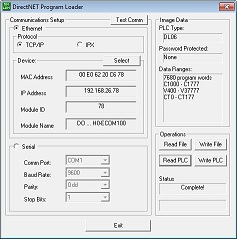 DirectNET
Program Loader (DNLoader) - is a free utility that allows you to
upload and download PLC programs and memory without the use of DirectSOFT. Use DNLoader to read the ladder program
(and optionally include system memory, user memory, and/or retentive memory) from a DirectLOGIC PLC and
save all of this data in a file. You can then use DNLoader to write the contents of
this file to another DirectLOGIC PLC of the same type. DirectNET
Program Loader (DNLoader) - is a free utility that allows you to
upload and download PLC programs and memory without the use of DirectSOFT. Use DNLoader to read the ladder program
(and optionally include system memory, user memory, and/or retentive memory) from a DirectLOGIC PLC and
save all of this data in a file. You can then use DNLoader to write the contents of
this file to another DirectLOGIC PLC of the same type.
Follow this
link
to a pdf file that contains a flowchart that fully describes how DNLoader operates.
DNLoader can use either a serial connection or
an Ethernet connection (via an ECOM or ECOM100) to communicate with the
DirectLOGIC PLCs. As of version 1.4 DNLoader can use either DirectNET (or
CCM) or KSequence protocol to connect to the PLC to the following DirectLOGIC
PLCs:
- DL05 / DL06
- D2-240 (port 2 only) D2-250 / D2-250-1
/ D2-260 / D2-262
- D3-350
- D4-430 / D4-440 / D4-450 / D4-454 / TI-425 /
TI-435
Note: Previous versions of DNLoader only support DirectNET (CCM)
protocol.
DNLoader correctly handle PLCs with password
protection enabled by requiring the password be entered in able to read the
data is read from the source PLC. The password is then encrypted as part of
the data that is saved to disk. The password will be written to the
destination PLC along with the program and any other data, and then the PLC
will be locked just as the source PLC was locked.
DNLoader runs properly on the following
Windows Operating Systems:
- Windows XP (32 & 64 bit)
- Windows 7 (32 & 64 bit)
- Windows 8
- Windows 10
DNLoader.Zip
Last Update : 20 Dec 2018
File Size : 740Kb
Version : v1.5.0.1
view the DirectNET Program Loader Revision History
|
|
|
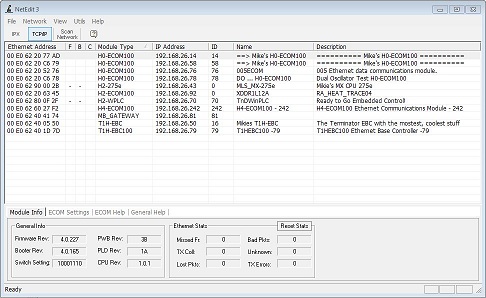 NetEdit
v3 is the the free utility that is used to manage many aspects of our
Ethernet-enabled devices. This includes the configuration of the network
settings, updating the firmware in the devices, and setting up any
runtime configuration options that are available.
The use of an Excel-style grid allows the list of devices to be sorted
by any column. The built-in Export feature will save the current device
list information to a CSV file. The 'Restore Factory Settings' function
will reset Name, Module ID, IP Address and Description of a device to their default
values. NetEdit
v3 is the the free utility that is used to manage many aspects of our
Ethernet-enabled devices. This includes the configuration of the network
settings, updating the firmware in the devices, and setting up any
runtime configuration options that are available.
The use of an Excel-style grid allows the list of devices to be sorted
by any column. The built-in Export feature will save the current device
list information to a CSV file. The 'Restore Factory Settings' function
will reset Name, Module ID, IP Address and Description of a device to their default
values.
NetEdit is automatically installed as part of both
Do-more Designer and
DirectSOFT PLC programming
packages. The version of NetEdit installed is the version that was
available when the respective installations were built. The
link below is to the lastest version of NetEdit
that is currently available.
The installation of NetEdit v3.17j
and later will also install
ERM Workbench which is used to
configure ERMs and ERM100sLive Update
NetEdit v3 also has an integrated firmware update
facility for all of the EBCs & EBC100s, ECOMs, ECOM-Fs, ECOM100s & BX-ECOMLTs,
BX-MBIOs, BX-DMIOs, GS-EDRVs & GS-EDRV100s, ERMs &
ERM100s, PBCs, the H0-PSCM, and the MB-Gateway. The 'Live Update' facility will
retrieve the latest firmware files from the Host Engineering web site, then
indicators in the 'F', 'B' and 'C' columns will show which devices have out of
date firmware, out of date boot loaders, and/or address configuration conflicts.
Note: You
may have to disable Window's built-in firewall to successfully
update the firmware or boot loader in the Ethernet device. You can turn
always it back on after the
firmware update has completed.
IPConfigTool
Is a utility program that is installed in
the same folder as NetEdit. It used to write the IP configuration in any
of our Ethernet devices by finding the device on the network using its
hardware (MAC) address. This is typically used to recover one of our
Ethernet-equiped devices that
was given an IP Address that is not accessible on the network where
NetEdit is running.
(ECOM & ECOM100) PEERLINK Setup, Test
CPU Access, Test EMail Setup
Setup the internal Peer-to-Peer configuration
table in ECOMs and ECOM100s so that networking instructions (RX / WX and NETRX /
NETWX) will not be forced to use TCP/IP broadcasts. The Peer-to-Peer configuration table in ECOM100s
can also be configured to allow the ECOM100 to operate as a Modbus TCP/IP client
(master) utilizing the DirectLOGIC PLC's networking instructions (RX / WX and
NETRX / NETWX).
NetEdit3 also has the 'Test CPU Access'
function to verify the backplane communication through the ECOM and ECOM100 to
the PLC's CPU. The 'Test Email' function allows you
to test the Email configuration parameters that are stored in the ECOM100 and
you can setup Email Authentication via a User ID and Password if required.
(EBC / EBC100 / BX-DMIO / BX-MBIO) Show Base Contents
When used to configure Remote Base
Controllers, the 'Show Base Contents' function will display a list of the I/O modules that are in
the base, and if applicable, will display their Modbus TCP/IP addresses.
NetEdit version 3.16 or later is required to setup any analog input or output modules in an BX-MBIO or BX-EBC100 system. This
analog module setup must be
done via the Ethernet port even if using Modbus/RTU (serial) as the controlling protocol for the connected I/O.
|
|
Latest Standalone Version of NetEdit and ERM Workbench
Last Update :
27 March 2026
NetEdit3 : v3.17m
ERM Workbench : v2.4
Setup NetEdit ErmWB (WinZIP)
|
|
NetEdit v3 Revision History |
| Version |
Date |
Description of Problems / Additions / Changes |
| 3.17m |
27-Mar-2026 |
Show Base contents updated
for BX-MBIO.
Show warning if IP Address is changed but the Subnet
Mask remains at default.
Retain and Restore the NIC used in last
NetEdit session.
Added Refresh Network Adapter List.
Display ? (instead of *) in Firmware column if firmware version is 0.0.0
(no firmware loaded).
Launch LiveUpdate at startup.
Fixed
a problem where a BRX protocol POM's IP address was not properly handled
after a firmware update.
Fixed a problem where you could not
select an IP address on a NIC that has multiple IP addresses assigned to
it.
Added info message that an ECOMLT will also need firmware
update if boot loader is updated.
Fixed a problem where the list
of devices would sometimes be empty on startup.
Added Browse to PLC Web Page selection for BRX CPUs.
Added Help tab details for SMTP Viewer Utility.
|
| 3.17j |
10-Nov-2022 |
Fixed a problem of mis-reporting IP Address collision in the Conflict column.
Added installation of ERM Workbench.
Fixed some user interface problems in the BX-P-ECOMLT Advanced dialog.
|
| 3.17h |
10-Aug-2022 |
Added an option for Do-more BRX CPUs to utilize DHCP (instead of only supporting hard coded IP Addresses).
Added support for BX-ECOMEX.
Properly handle H0-ECOM100 hardware rev differences.
If no Ethernet devices found, prompt the user to select a different Network Adapter via the menu.
Added web links to NetEdit FAQs to the Help menu.
|
| 3.17e |
31-Mar-2020 |
Added Support for Rev 8A hardware versions of the BX-DMIO, BX-MBIO, BX-EBC100. This version of NetEdit is required to either:
- update a BX-DMIO, BX-MBIO or BX-EBC100 that is H/W Rev 8A or later.
- update a BX-DMIO, BX-MBIO or BX-EBC100 that is H/W Rev 5A using v4.2.16 boot loader & v4.2.100 firmware files.
Note: using an older revison of NetEdit to either update Rev 8 Hardware, or to use Rev 8 boot loader and firmware
files will leave the BX-DMIO, BX-MBIO, or BX-EBC100 stuck in the boot loader (ERR LED blinking). To remedy this in either case,
use NetEdit v3.17e (or later) to reload the boot loader and firmware files.
|
| 3.17d |
25-Oct-2019 |
Fixed a problem that prevented 10Base-T versions of our Ethernet devices from showing up properly. These devices would show up
in the list with Ethernet (MAC) Addresses of 00:00:00:00:00:00 and a Device Type of UNKNOWN.
Now installs IPConfig103.exe (a utility that uses a directed broadcast to manually set the IP address information of a device
that can't be seen in NetEdit).
|
| 3.17c |
12-Jun-2019 |
Added firmware folders for new hardware revisions of H2-EBC100, H2-ERM100, MB-GATEWAY, and GS-EDRV100.
|
| 3.17b |
27-Mar-2019 |
Fixed a problem that prevented Live Update from seeing updates because of the browser cache settings.
Correctly read new IP Settings after an update.
Fixed a problem where the Flags in the Advanced ECOM Settings were not properly set.
Fixed a problem where the IP Settings were not properly being read if the device's current IP is 255.255.255.255.
|
| 3.17a |
15-Feb-2019 |
Added support for H0-ECOM100 Rev 9 hardware. Added the H0-ECOM100n2 folder for the boot loader and firmware files for the Rev 9 H0-ECOM100.
Fixed a probem that caused NetEdit3 to continue to use directed broadcasts after selecting a device to set up.
|
| 3.17 |
20-Dec-2018 |
Added support for D2-262CPU.
|
| 3.16 |
23-May-2018 |
Added support for BX-DMIO (Do-more I/O), BX-EBC100 and BX-MBIO (Modbus I/O).
For Devices that support Modbus/TCP, added ability to disable using port 502 and specify a range of alternate port numbers to use.
|
| 3.14c |
10-May-2017 |
Added support for BX-ECOMLT.
Note: any time the boot loader in the BX-ECOMLT is updated you must also reload the operating system (firmware).
|
| 3.14a |
16-Oct-2015 |
Fixes a crash that would occur on some computers when a NIC was selected from the list of available Adapters.
Adds the ability to connect to a single device by manually specifying the MAC address or IP address; removes need to do a network broadcast.
|
| 3.13 |
14-Apr-2015 |
Installs IPConfigTool which can set the IP Address, Subnet Mask, and Gateway Address of out Ethernet devices using a directed
broadcast to the MAC address of the device. This provides a way to reconfigure the IP addressing of a device whose current IP
addressing makes it unreachable on the current TCP/IP network and IPX protocol is not available on the Operating System being used.
|
| 3.12 |
24-Mar-2014 |
Live Update now uses a different process to detect and then download updated firmware files from the Host Engineering website.
Note: As of this update, earlier versions of NetEdit3 will no longer be able to detect and download
updated firmware files. It is highly recommended that you upgrade to the latest version of NetEdit3.
|
| 3.10 |
11-Sept-2012 |
Added the Network-> Adapter menu option. On computers that have multiple NICs (Network Interface Card), this option allows the
user to specify which NIC that NetEdit should use.
|
| 3.9a |
26-Mar-2012 |
Added the following three configuration options to the ECOM/ECOM100 Advanced dialog:
- Enable PEERLINK (ECOM100) - reserved for use with the Do-more CPU.
- Enable DIP Switch 5 Lockout - allows the use of DIP Switch #5 to write protect the configuration of ECOM and ECOM100, and
removing the ability to update the firmware and boot loader. Refer to the
revision history for the ECOM100 modules for more information on this new feature.
- Enable Web Server (ECOM100) - enables and disables the ability to use a web browser to configure the ECOM100. Refer to the
revision history for the ECOM100 modules for more information on
this new feature.
|
| 3.8b |
10-Feb-2012 |
Fixed a problem that would sometimes leave the 100Base-T devices stuck in the boot loader after a failed firmware update.
|
| 3.8a |
6-Jul-2011 |
Fixed a problem with the firmware update progress bar.
|
| 3.8 |
8-Jun-2011 |
Added support for the MB-Gateway and
GS-EDRV100.
|
| 3.7c |
22-Jan-2009 |
Added a new group of options to the Advanced tab for the ECOM100 which allows the user to Force the ECOM100 into 10Mb mode
(instead of 10/100Mb mode), and allows the user to make the HTML configuration pages read-only, thereby preventing updates
to the ECOM100 configuration via a web browser.
Lengthened timeouts when updating firmware for T1H-PBC and H2-PBC.
Added ability to include username/password for e-mail authentication.
|
| 3.7b |
12-May-2008 |
Fixed a bug that was introduced in 3.7a that would cause the firmware update process to fail.
|
| 3.7a |
6-May-2008 |
Display more informative messages for errors during Live Update.
No longer include firmware files for Ethernet devices, use Live Update to get the latest firmware files, or download
All_Firmware_Binary_Files.Zip (on Support->Firmware page) if you can't use Live Update.
|
| 3.7 |
21-Feb-2007 |
Added 'Test Email' option for Hx-ECOM100s.
Excluded the following addresses from being used in the IP Address field for all ECOM100s and EBC100s:
224.x.x.x through 255.x.x.x (Multi-cast range)
x.x.x.255
127.0.0.0 & 127.0.0.1
|
| 3.6d |
30-Jan-2007 |
Added a field to adjust the Modbus Slave Timeout value under the Advanced dialog. When the ECOM100 is operating as a Modbus
TCP/IP slave, this timeout value is used to delete Modbus connections that haven't been accessed within the defined time period.
This feature requires matching firmware in the ECOM100 modules.
|
| 3.6c |
25-Oct-2006 |
Changed the "Test CPU Access!" function so that it works like the CPU detection function in our DirectSOFT PLC Programming Software.
No longer display a "Conflict" (an asterisk in the 'C' column of the selected device) if DHCP addressing is enabled and the "underneath" IP address is 0.0.0.0.
|
| 3.6b |
25-May-2005 |
Fixed problem that caused "Error 209 from DownloadBinFile".
Fixed problem that caused "Error 0" after upgrading firmware in H4-EBC, H4-ECOM or H2-ECOM.
Added more descriptive messages for Winsock errors.
|
| 3.6 |
12-Apr-2005 |
Added ability to adjust the timeout value for Modbus/TCP requests in the H2-ECOM100. If the ECOM100 is begin used as a Modbus/TCP master,
this is the timeout value used by the ECOM100 when it processes the RX / WX instructions which are used to do the master / slave
communication.
|
| 3.5a |
1-Feb-2005 |
Fixed a problem that prevented NetEdit v3 from being able to upgrade a device that had a release 2.xx.yy boot loader.
|
| 3.5 |
14-Dec-2004 |
Added configuration support for the new H2-EBC100 and H2-ECOM100. This new version of NetEdit v3 is required to configure the new
options available in the H2-EBC100 and the H2-ECOM100.
Fixed a problem with the firmware and booter loader upgrade process where
an error during the upgrade wasn't detected, so it looked like the upgrade process worked when in fact it didn't.
|
| 3.4 |
12-Aug-2004 |
Added configuration support for the new T1H-EBC100. This new version of NetEdit is required to configure the new options available
in the T1H-EBC100.
Added reporting of MODBUS/TCP I/O addressing in the Show Base Contents dialog.
Added ability to display the hardware version information.
|
| 3.2a |
20-Feb-2004 |
Created installation file (SetupNE3.Exe) for NetEdit v3.
Increased the maximum number of devices that can be displayed from 100 to 500.
Fixed a bug where if the PLC containing an ERM was in the RUN mode, NetEdit would appear to make a change to ERM parameters,
but they would not actually occur.
|
| 3.2 |
11-Feb-2004 |
Improved error reporting on failed attempts to write configuration data.
Added File -> Export.
|
| 3.1 |
19-Jan-2004 |
Initial Release of NetEdit3.
|
|
|
|
|
|
DBWin32
This program displays debugging messages from DirectSOFT32 and the
DSData Server.
|
|
DSStart
This utility allows you to sequence the startup of several applications
with a single icon, usually in your startup group . You specify the
application along with a delay time. This is useful when you want to start
the DDE Server and allow it time to get through it's initialization before
an application tries to access any data.
This utility program is a 16-bit application that does not understand
long file names, you must use the hashed names for pathname elements
longer than 8 characters, e.g. "C:\Program Files\.." would be entered as
"C:\Progra~1\..".
|