
DNLoader FAQ0001 (see also DirectSOFT FAQ0127)
09-Jan-2004
Q: Is there a software utility that can be used to upload/download
programs without using DirectSOFT?
A: Yes. Host Engineering has created a free program called
DNLoader that does just that. You would use it to read the program and
(optionally) the retentive V-memory from a DL PLC and save this data
in a file. This file cannot be read by DirectSOFT. You can then use
DNLoader to write the contents of this file to another DL PLC of the
same type. It supports serial or Ethernet connections and also
supports PLC Passwords. It is the ideal tool for an OEM or System
Integrator. You can download your copy from our website under the
Support --> Utilities section.
DNLoader FAQ0002
30-Jun-2004
Q: During upload getting, "Error reading data from PLC."
A: This is like any other DirectSOFT communication error.
See DirectSOFT FAQ0013 for
suggestions. You can even download the Demo version of DirectSOFT and
attempt a link using that software to get more details in the error.
If you can connect using DirectSOFT (with DirectNET protocol set in
the link), you should be able to connect using DNLoader.
DNLoader FAQ0003
18-Apr-2022
Q: What DL PLCs are supported by DNLoader?
A: DNLoader now uses the DirectNET and K-seq protocols. The
following chart shows which DL PLCs can be used with DNLoader and which
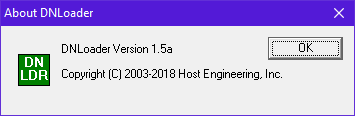
ones cannot. To see what version you are using, in the Title Bar of
DNLoader, click on the icon in the very top left and select "About
DNLoader..." You will see something like this:
| Direct Logic CPUs | DNLoader Version | ||||||||||||
| v1.0 | v1.1b | v1.1c | v1.1d | v1.2a | v1.3 | v1.3b | v1.3c | v1.3d | v1.3e | v1.4 | v1.5 | v1.5a | |
| 05 | Yes | Yes | Yes | Yes | Yes | Yes | Yes | Yes | Yes | Yes | Yes | Yes | Yes |
| 06 | Yes | Yes | Yes | Yes | Yes | Yes | Yes | Yes | Yes | Yes | Yes | Yes | Yes |
| 130 | |||||||||||||
| 230 | |||||||||||||
| 240 | Yes | Yes | Yes | Yes | Yes | Yes | Yes | Yes | Yes | Yes | Yes | Yes | Yes |
| 250* | Yes | Yes | Yes | Yes | Yes | Yes | Yes | Yes | Yes | Yes | Yes | Yes | Yes |
| 250-1 | Yes | Yes | Yes | Yes | Yes | Yes | Yes | Yes | Yes | Yes | Yes | Yes | Yes |
| 260 | Yes | Yes | Yes | Yes | Yes | Yes | Yes | Yes | Yes | Yes | Yes | Yes | Yes |
| 262 | Yes | ||||||||||||
| TI-325 | |||||||||||||
| 330 | |||||||||||||
| 330P | |||||||||||||
| TI-330S | |||||||||||||
| TI-335 | |||||||||||||
| 340 | |||||||||||||
| 350 | *** | *** | *** | *** | *** | *** | *** | *** | *** | Yes | Yes | Yes | Yes |
| TI-425 | Yes | Yes | Yes | Yes | Yes | Yes | Yes | Yes | Yes | Yes | Yes | Yes | Yes |
| 430 | Yes | Yes | Yes | Yes | Yes | Yes | Yes | Yes | Yes | Yes | Yes | Yes | Yes |
| TI-435 | Yes | Yes | Yes | Yes | Yes | Yes | Yes | Yes | Yes | Yes | Yes | Yes | Yes |
| 440 | Yes | Yes | Yes | Yes | Yes | Yes | Yes | Yes | Yes | Yes | Yes | Yes | Yes |
| 450** | Yes | Yes | Yes | Yes | Yes | Yes | Yes | Yes | Yes | Yes | Yes | Yes | Yes |
| 454 | Yes | Yes | |||||||||||
*NOTE
- With the 250, DNLoader gives "Error! Error reading V memory!" if
attempting to read the program via serial ports. (See DNLoader
FAQ0008).
**NOTE - With the 450, DNLoader only works with the first
7680 words. If you have a memory cartridge giving you more memory than
this, DNLoader will not work with anything over the 7680.
***NOTE
- With the 350, DNLoader gives "Error! Error reading V memory!" (See DNLoader FAQ0015).
DNLoader FAQ0004
12-Jul-2005
Q: How do passwords for both the .DAT file and the PLC work in
DNLoader?
A: The easiest thing is to view the .PDF file that comes
with DNLoader when you install it. Or you can download it
independently here: DNLoader Flow Chart.PDF
DNLoader FAQ0005
26-Jul-2005
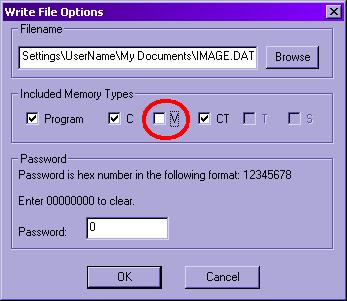
Q: When downloading file to a DL240 over Port2 using <Write
PLC> button, get "Error writing image to PLC!".
A: This is caused by the DL240 not allowing writes to his
retentive V-memory. To circumvent this error, you will have to have a
.DAT file for your DL240 that does not have V-memory stored in it.
This means that whoever created the .DAT file, will have to create one
with V-memory deselected for the <Write File>. In
order to create that type of .DAT file you must first have
DNLoader v1.2a or later.
When you are going to create a .DAT file after you read the PLC using <Read PLC> button, then you press the <Write File> button. This gives you the following dialog (Write File Options). Deselect the "V" option as shown:
After naming your file and giving it a password (if desired), then pres the <OK> button. This will create a .DAT file without V-memory. Now, writing this file to a DL240 will work and not give the error because V-memory is not being written.
This, however, creates a potential application problem. Since V-memory is not going to be written using DNLoader, then if you want to initialize values in V-memory for your application, you will have to either do that manually after downloading the program, or program some rungs in the ladders that initialize the V-memory on the first PLC scan (e.g. SP0).
DNLoader FAQ0006 (similar to DirectSOFT FAQ0191)
04-Feb-2005
Q: DNLoader doesn't appear to store the Watchdog timer settings in
the .DAT file, or write it back to the PLC.
A: This is true. It is also true for DirectSOFT. Using
DirectSOFT the value can be stored and written manually, but it is not
stored in project file.
DNLoader FAQ0007
17-Jan-2014
Q: What Windows operating systems does DNLoader work with?
A: See the following chart:
| DNLoader Versions |
Windows Operating Systems | |||||||||||
| Win3.11 | Win95 | Win98 | WinME | WinNT4 | Win2K | WinXP | WinXP64 | WinVista | WinVista64 | Win7 (3) | Win8 (3)(4) | |
| v1.0 | ü | ü | ü | ü | ü | (1) | (2) | (1) | ü | (1) | ||
| v1.1b | ü | ü | ü | ü | ü | (1) | (2) | (1) | ü | (1) | ||
| v1.1c | ü | ü | ü | ü | ü | (1) | (2) | (1) | ü | (1) | ||
| v1.1d | ü | ü | ü | ü | ü | (1) | (2) | (1) | ü | (1) | ||
| v1.2a | ü | ü | ü | ü | ü | (1) | (2) | (1) | ü | (1) | ||
| v1.3 | ü | ü | ü | ü | ü | (1) | (2) | (1) | ü | (1) | ||
| v1.3b | ü | ü | ü | ü | ü | (1) | (2) | (1) | ü | (1) | ||
| v1.3c | ü | ü | ü | ü | ü | (1) | (2) | (1) | ü | (1) | ||
| v1.3d | ü | ü | ü | ü | ü | (1) | (2) | (1) | ü | ü | ||
| v1.3e | ü | ü | ü | ü | ü | (1) | (2) | (1) | ü | ü | ||
NOTES:
(1) - Have
not tested officially but probably will work.
(2) - On some PCs serial communication
seems to be inconsistent (i.e. it works most of the time, but will
sometimes fail). In case of failure, restart DNLoader, and try again.
(3) - Both 32-bit and 64-bit versions work.
(4) - Win8 RT version not supported
DNLoader FAQ0008
28-Mar-2006
Q: When trying to read a program from a DL250, get "Error! Error
reading V memory!"
A: This is a bug when operating DNLoader with a DL250 and
using one of the serial ports (Port1 or Port2). But if an H2-ECOM /
H2-ECOM100 is used in the DL250, the error does not occur. Also all
other DL205 CPUs work fine (e.g. DL240, 250-1, 260, etc.). Also, all
other DL05/06 and DL405 CPUs work fine as shown in DNLoader
FAQ0003 above.
DNLoader FAQ0009
16-Aug-2010
Q: Can DNLoader be executed automatically instead of with the
manual GUI interface?
A: As of version v1.3 you can run DNLoader from a command
prompt with switched options. This allows it to be used without user
interfacing and no GUI.
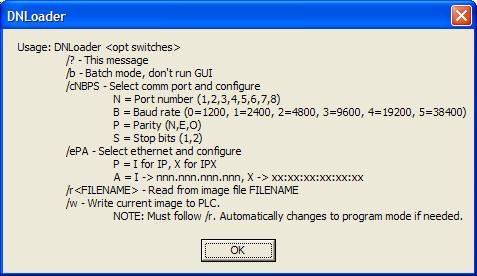
NOTE: This command-line option only works for writing a .DAT file to a PLC. It does NOT work for reading a PLC and creating a .DAT file.
To see the switch options use the /? switch. The following window will display with the /? option.
DNLoader FAQ0010 (see also ECOM FAQ0042;
DirectSOFT FAQ0048; DL Plus FAQ0009; DSData FAQ0005; EZ Ethernet
FAQ0008; HA-TADP FAQ0002; Lookout Direct FAQ0014; NetEdit FAQ0005; SDK
FAQ0020)
31-Jan-2008
Q: Why doesn't the ECOM use subnet mask or gateway address like the
ECOM100?
A: Since the ECOM doesn't do "master"-type communications, it
doesn't use the subnet mask or gateway address. Whatever talks to the
ECOM will be using IPX or UDP/IP, and the ECOM simply swaps the
destination and source addresses in the telegram and responds in this
way, not "caring" about the subnet or gateway. However, the ECOM100
acts more like a conventional TCP/IP device. The ECOM100 has the
capability to be a master and has a full-blown TCP stack inside. Thus,
if it is to transmit to an IP address not on its subnet, it will, of
course, transmit to its configured gateway address instead.
DNLoader FAQ0011 (see also CTRIO FAQ0045;
DirectSOFT FAQ0132; DL Plus FAQ0010; DS Data FAQ0102; EBC FAQ0083;
ECOM FAQ0084; EDRV FAQ0084; ERM FAQ0058; EZ Ethernet FAQ0010; General
FAQ0004; HA-TADP FAQ0008; Lookout Direct FAQ0015; NetEdit FAQ0037; PBC
FAQ0014; PSCM FAQ0003; SDK FAQ0022; SERIO FAQ0004; WinPLC FAQ0038)
31-Dec-2009
Q: What is the export classification of your products (e.g. ECCN)
A: None of our products have an ECCN. Automation Direct sells our
products and they export EAR99 NLR (No License Required). ECCN
is Export Controlled Classification Number and none of our
products are controlled.
DNLoader FAQ0012
30-Mar-2010
Q: While trying to Read PLC with DL06 serially or over Ethernet,
get "Error! Error writing program memory."
A: Of course, this error means DNLoader couldn't write the PLC
memory. Most of the time, when a DL06 is involved, this is because
some DL06s (particularly older ones) take too long to write to their
own Flash ROM, and DNLoader consequently is timing out. Older DNLoader
versions had a fixed timeout value that was sometimes not long enough
to allow for these slower DL06s to complete their writes.
To fix, upgrade to DNLoader v1.3c or later.
DNLoader FAQ0013
21-May-2010
Q: There are not enough COM ports available (only goes to COM8) in
DNLoader.
A: We added up to COM99 on the GUI (Graphical User Interface) mode
of DNLoader (i.e. the command-prompt mode of DNLoader still only goes
to COM8).
This new feature is added to DNLoader v1.3b or later.
DNLoader FAQ0014
22-Jun-2010
Q: Trying to <Read File> and getting "Unknown File
Format" error.
A: This is caused by creating an Image.DAT file with a later
version of DNLoader than the version of DNLoader being used to <Read
File>. Thus, make sure the DNLoader trying to read the
Image.DAT file is the latest version.
DNLoader
FAQ0015
17-Jan-2014
Q: When using DL350 CPU get "Error! Error reading V memory!"
A: This is caused by a bug in DNLoader that had the wrong memory
range assigned to DL350 CPU. This is corrected in a the following
version:
DNLoader v1.3e or later.
DNLoader
FAQ0016
17-Mar-2014
Q: When
downloading file to a DL240 over Port2 using <Write PLC>
button, get "Error communicating with target device!"
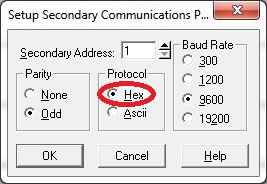
A: This is normally caused by having the DL240's Port2 configured
for "ASCII" mode instead of "Hex" mode. To change this:
DNLoader
FAQ0017
19-Jul-2023
Q: When
attempting <Write PLC> to the newest DL06 (date code on label:
2348A or later), get "Error writing Program Memory."
A: This is normally caused by an older version of the DL06's
firmware (v4.10). Upgrade to v4.12 (or later) should fix this issue.
To upgrade the firmware in your DL06, you have to go to Automation
Direct's website, and click on <Tech Support> and look for
Firmware Updates. At the time of the writing of this FAQ, there is a
file: D06_V412.zip that includes the Firmware Upgrade Tool
and the new firmware with which to do this.