Refer to the picture below.
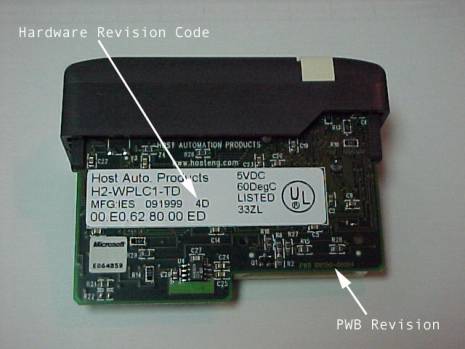
First, check the pwb revision level. On the back of the WinPLCs circuit board, below and to the right of the large white sticker, you’ll find the pwb revision level. It will in the form ‘pwb 100150-0004’.
If your revision level ends in ‘–00004’, you have a board capable of supporting the H2-SERIO module.
If your revision level ends in ‘–00003’, the board cannot be upgraded to support the H2-SERIO module. You will need to purchase a new WinPLC to access this module.
Next, check the hardware revision code. You’ll find this printed to the right of the date code, (on some early WinPLCs, this number may be handwritten or it may be missing entirely). If it's present, it will be in the form 4D, 4E, 4F, etc.
If the revision code is 4D or later, you’re good to go, no additional hardware changes are necessary.
If the hardware revision code is 4A, 4B, or 4C, OR if the code is missing completely, your WinPLC hardware needs to be upgraded. This hardware upgrade can only be done at the factory.
If you can provide proof of purchase of an H2-SERIO, the upgrade to the WinPLC will be done free of charge. Fax a copy of the sales order or the PO to us at (423) 913-3287 attn: WinPLC Upgrade – please include your e-mail address and phone number on the fax. We will e-mail you an RMA# to use and the shipping address.