
NetEdit FAQ0001
03-Jun-2002
Q: Can I use NetEdit to do firmware updates?
A: As of NetEdit3, this is possible. Older version would not
allow this.
NetEdit FAQ0002
03-Jun-2002
Q: Can TCP/IP protocol be used to upgrade firmware as well as IPX?
A: With NetEdit3 it is possible to upgrade firmware using IPX or
TCP/IP protocols.
NetEdit FAQ0003 (see also ERM FAQ0003, EBC
FAQ0006, EDRIVE FAQ0004)
09-Sep-2009
Q: NetEdit sees ERM, EBC and EDRV, but ERM Workbench gets error
"ERM not found" when trying to write the configuration to the ERM.
A: Downloading the latest version of ERM Workbench may remedy
this problem; especially if you are using the ERM Workbench Wizard.
You should download at least ERM Workbench v1.1 Build 26. Otherwise
here are some things to try:
NetEdit FAQ0004 (see also EBC FAQ0078; ECOM
FAQ0025; EDRV FAQ0011; ERM FAQ0052; EZ Ethernet FAQ0007)
27-Jan-2010
Q: Can retries and timeout values for NetEdit be adjusted to allow
it to find Host Ethernet devices on much slower networks?
A: No, but we will probably include this ability in future
releases of NetEdit (greater than v3.7). Currently NetEdit sends out a
broadcast and waits 600 ms for devices to respond. If the devices take
longer than this to respond they will be missing from his list. After
the responses are gathered, NetEdit makes a list and then polls each
device in the list one at a time to get detailed data, but waits only
250 ms for response from each device. If the device takes longer than
this to respond some of its data may be missing. This is not a problem
on a normal wired network, but can be a problem on a wireless network
or across the Internet where responses can inadvertently be long and
inconsistent. Also, since a broadcast is used, any device between
NetEdit and the Host Ethernet modules that block broadcasts can
prevent NetEdit from seeing anything.
NetEdit FAQ0005 (see also ECOM FAQ0042;
DirectSOFT FAQ0048; DL Plus FAQ0009; DNLoader FAQ0010; DSData FAQ0005;
EZ Ethernet FAQ0008; HA-TADP FAQ0002; Lookout Direct FAQ0014; SDK
FAQ0020)
31-Jan-2008
Q: Why doesn't the ECOM use subnet mask or gateway address like the
ECOM100?
A: Since the ECOM doesn't do "master"-type communications, it
doesn't use the subnet mask or gateway address. Whatever talks to the
ECOM will be using IPX or UDP/IP, and the ECOM simply swaps the
destination and source addresses in the telegram and responds in this
way, not "caring" about the subnet or gateway. However, the ECOM100
acts more like a conventional TCP/IP device. The ECOM100 has the
capability to be a master and has a full-blown TCP stack inside. Thus,
if it is to transmit to an IP address not on its subnet, it will, of
course, transmit to its configured gateway address instead.
NetEdit FAQ0006
11-Sep-2002
Q: Does NetEdit come with the CD in the H2-ECOM-START kit?
A: Actually NetEdit used to come on a disk that was inserted into
the manual that came with the H2-ECOM-START kit. It was not on the CD.
Now, however, NetEdit3 (our latest) is installed with DirectSOFT. And,
of course, you can always download NetEdit3 from our website.
NetEdit FAQ0007
06-Jul-2010
Q: Why would NetEdit list the same module twice or show duplicate
entries?
A: We have found two reasons for this:
NetEdit FAQ0008 (see also EBC FAQ0036)
26-Sep-2002
Q: Using NetEdit to configure an H4-EBC, but the F4-16DA-2 is not
listed as an option to put in the slots.
A: You can choose one of two things:
NetEdit FAQ0009 (see also DirectSOFT FAQ129; DS
Data FAQ0070; ECOM FAQ0030)
03-Oct-2002
Q: Does the ECOM work with DHCP? Or does the PC's NIC have to have
a static IP address in order to communicate with an ECOM?
A: The ECOM does not support DHCP addressing, (ECOM100s support
DHCP). The ECOM must have a static IP address. However, the PC that is
talking to the ECOM does not have to have a static IP address. Things
to consider:
NetEdit FAQ0010 (see also ECOM FAQ0031)
01-Jul-2002
Q: Trying to use PLC-to-PLC communications between ECOMs but we see
broadcasts across the network; and our router won't pass the
broadcast.
A: When the PLC performs an RX or WX instruction through an ECOM,
the ECOM uses a broadcast packet to locate the slave ECOM with the
DirectNET Node Number specified and perform the read or write
transaction. These broadcast packets will increase network usage, and
broadcast packets are normally filtered out by routers, bridges, etc.
To work around these issues, NetEdit3 provides a way to configure the
ECOM to use a point-to-point UDP/IP packet to perform the transaction.
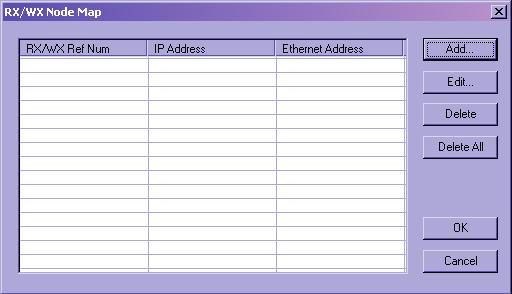
Here is how it works: the RX and WX instructions in the PLC only allow you to specify a DirectNET Node Number as the slave identifier. This node number will be in the range of 1-90. In the ECOM there is a "Node Number - to - IP Address" mapping table. To get to it press the <RX/WX Node Map> button on the "ECOM Settings" tab.
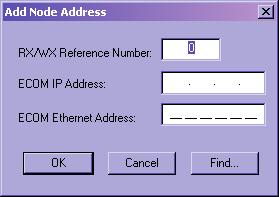
For each slave ECOM you want to communicate with, find its DirectNET node number in the table and enter the needed network information. Once this information is in the table, any RX or WX instruction the ECOM processes for that slave will use the information in the table instead of a broadcast packet.
You can enter the addressing information manually, but, you'll find it much easier to use the <Find> button in the Add dialog to add slaves to the table. "Find" will scan the local network and locate all of the ECOMs. You then simply pick the slave ECOM from the list and click <OK>; the required information for the table entry will be automatically generated.
NetEdit FAQ0011 (see also EBC FAQ0004; ECOM
FAQ0034; EDRV FAQ0008; ERM FAQ0024; PBC FAQ0015)
06-Jan-2015
Q: Getting various errors when attempting to update the
booter/firmware for my EBCs, ECOMs, EDRVs and ERMs.
A: First make sure you isolate the device from all other tasks
(i.e. put the PLC in the STOP mode; stop HMI; isolate from busy
network traffic). Secondly, make sure you are using the latest version
of NetEdit3 which can be downloaded for free here:
http://www.hosteng.com/SW-Products/NetEdit3.zip
Here are some common problems experienced:
NetEdit FAQ0012 (see also DS Data FAQ0087;
DirectSOFT FAQ0180; EBC FAQ0052; ECOM FAQ0040; EDRV FAQ0010; ERM
FAQ0034; EZ Ethernet FAQ0026)
27-Apr-2004
Q: Getting various errors when attempting to use NetEdit to see or
establish a link to a Host Ethernet device.
A: Here are know errors and their suggested solutions:
CAUTION: You may want to consult your Network Administrator before doing any of the solutions below! He/she may not want you to change your PC's setup at all!
(5) "Error reading
configuration values from device."
First of all, there was a bug in
versions of NetEdit previous to v3.1, that when you pressed the
Query Network button this error could pop up. If this is the case
then you just need to download a later copy (at least v3.1) of
NetEdit from our website. If this is not the case then
notoriously, this error is caused by one of the following:
If none of these things fix the
problem, then it is possible that the EBC/ECOM/EDRV/ERM/EZ Ethernet
device is defective and you may need to send it in for repair.
NetEdit FAQ0013 (see also ECOM 0028; EBC
FAQ0033, ERM FAQ0020, EDRV FAQ0007, EZ Ethernet FAQ0017; DirectSOFT
FAQ0181; DS Data FAQ0088; SDK FAQ0012)
20-Jul-2018
Q: What Ethernet protocols are used by your products?
A: Refer to chart below:
| Product | Ethernet Protocols | ||||||||||||||
| UDP/IP | IPX | TCP/IP | Raw Ethernet Broadcast (1) | ||||||||||||
| K-seq | DirectNet | ECOM (2) | Koyo Backplane | User Defined Data | Proprietary (1) | K-seq | DirectNet | ECOM (2) | Proprietary (1) | Modbus TCP Master | Modbus TCP Slave | Proprietary (1) | Koyo Backplane | ||
| Hardware | ECOM | Y | Y | Y | Y (3) | Y (4) | Y | Y | Y | Y (5) | |||||
| ECOM100 | Y | Y | Y | Y (3) | Y (4) | Y | Y | Y | Y (6) | Y | Y (5) | ||||
| EBC | Y | Y | |||||||||||||
| EBC100 | Y | Y | Y | ||||||||||||
| ERM | Y (7) | Y (7) | (8) | ||||||||||||
| EDRV | Y | Y | Y (12) | ||||||||||||
| EZ Ethernet | Y | Y | Y | Y | Y | Y | |||||||||
| EZ EtherPLUS | Y | Y | Y | Y | Y | Y | Y | ||||||||
| WinPLC | Y | ||||||||||||||
| Software | DirectSOFT | Y | Y | Y | Y | Y | Y | ||||||||
| DS Data | Y | Y | Y | Y | Y | Y | |||||||||
| Ethernet SDK | Y (9) | Y | Y | Y (9) | Y | Y | |||||||||
| NetEdit | Y (10) | Y (11) | Y (10) | Y (11) | |||||||||||
(1)
Not an industry standard. However, protocol is available for 3rd-party
development upon request.
(2) Not really a distinct protocol. This setting is used
to intelligently pick K-sequence or DirectNet as needed by the
hardware/software.
(3) Used when doing ECOM-to-ECOM via RX/WX instructions
with RX/WX Node Map configured in sending ECOM.
(4) Used when doing ECOM-to-PC (Report-by-Exception) via
RX/WX instructions (Address 90 only) with ECOM's dipswitch 7 set ON.
(5) Used when doing ECOM-to-ECOM via RX/WX instructions
without RX/WX Node Map configured in sending ECOM.
(6) RX/WX Node Map must be configured in ECOM.
(7) ERM can talk to one slave with UDP/IP and another
with IPX simultaneously.
(8) No longer in planning (i.e. canceled).
(9) Requires K-sequence protocol spec (request from
Automation Direct)
(10) Uses K-sequence to perform "Test CPU Access!"
function.
(11) Uses this protocol to perform "Show Base
Contents..." function.
(12) The older HA-EDRV2 cannot talk Modbus TCP.
NetEdit FAQ0014 (see also Do-more
FAQ0038; CTRIO FAQ0046; EBC FAQ0047; ECOM FAQ0036; EDRV FAQ0009;
ERM FAQ0030; EZ Ethernet FAQ0018; PBC FAQ0009; PSCM FAQ0001;
WinPLC FAQ0018; MB-GATEWAY FAQ0003)
13-Dec-2017
Q: What software tool do I use to upgrade/downgrade my Host
Engineering hardware?
A: Refer to the following:
| Host Hardware | Part Number | Firmware/Booter Upgrade Tool |
|
CTRIO CTRIO2 |
H0-CTRIO H4-CTRIO H0-CTRIO2 |
CTRIO
Workbench |
|
H2-CTRIO
T1H-CTRIO H2-CTRIO2 T1H-CTRIO2 |
CTRIO
Workbench or Do-more Designer |
|
| DM1 DM1E |
BX-DM1-x BX-DM1E-x H2-DM1 H2-DM1E T1H-DM1 T1H-DM1E |
Do-more Designer |
| EBC EBC100 |
H2-EBC H4-EBC T1H-EBC T1H-EBC100 H2-EBC100 |
NetEdit3 |
| ECOM ECOM100 |
H0-ECOM H2-ECOM H4-ECOM H0-ECOM100 H2-ECOM100 |
|
| ECOMLT (POM) |
BX-P-ECOMLT | |
| EDRV EDRV100 |
GS-EDRV GS-EDRV100 |
|
| ERM ERM100 |
H2-ERM H4-ERM H2-ERM100 |
NetEdit3
or ERM Workbench |
| EZ Ethernet | EZ
Ethernet EZ EtherPLUS |
EZ Touch |
| MB-GATEWAY | MB-GATEWAY | NetEdit3 |
| PBC | H2-PBC | |
| PSCM |
H0-PSCM
H2-PSCM
|
|
| WinPLC | WinPLC | WinPLC Workbench |
NOTE: All the firmware for the above products can be downloaded using NetEdit3's File --> Live Update... The firmware files are stored in c:\HAPTools\Images folder, or in the case of the Do-more PLCs, under the Images subfolder in the Do-more Designer's installation Bin folder.
NetEdit FAQ0015 (see also EBC FAQ0054; CTRIO
FAQ0062)
02-Feb-2005
Q: Using an EBC100 and Modbus TCP protocol, how can I figure out
where the CTRIO parameters are mapped into the Modbus addresses?
A: The easiest way to do this is to use NetEdit3 and CTRIO
Workbench in combination. Follow these steps:
Here you can see that NetEdit3 has provided the Modbus addressing for you. Next you need only to see how these work in the CTRIO.
After manually entering these numbers from NetEdit3 into CTRIO Workbench's I/O mapping screen you can now see all the parameters and their appropriate Modbus TCP addressing.
NetEdit FAQ0016
14-May-2008
Q: When attempting to use Live --> Update feature, get "12029"
error message.
A: A 12029 error is a firewall issue error. This means that one or
more firewalls is blocking your attempt to open and/or retrieve files.
Most of the time this can be attributed to your WinXP Firewall. Please
follow these steps to add NetEdit3 to your WinXP Firewall's Safe List:
(1) Start --> Control Panel.
(2) Double-click on the Windows Firewall icon.
(3) Select the Exceptions tab.
(4) Press the <Add Program...> button.
(5) Use the <Browse...> button and add
c:\HAPTools\NetEdit3.EXE to the list.
(6) Press <OK> button.
(7) Reboot your PC.
If the problem persists, your PC might have a secondary firewall in
place. If so, you will also have to add NetEdit3 to its safe list as
well.
Also if you are working from an office or you are using your company's PC or Internet connection, it is possible that your company has some type of network firewall in place. You will have to contact your company's System Administrator for what to do about this.
NetEdit FAQ0017 (see also DirectSOFT FAQ0183; DS
Data FAQ0093; EBC FAQ0057; ECOM FAQ0043; EDRIVE FAQ0012; ERM FAQ0037;
EZ Ethernet FAQ0027)
27-Sep-2010
Q: How can I install IPX protocol for my NIC?
A: You can find instructions on how to do this for your
particular operating system by going to Start --> Help &
Support and searching for "Install NWLink." Below are the instructions
from Microsoft for doing this on a WinXP PC. The instructions are
similar for other operating systems (e.g. WinNT, Win98, WinME, Win2K).
To install NWLink IPX/SPX/NetBIOS
Compatible Transport Protocol
(1) Open Network Connections:
(a) Click Start
--> Settings --> Control Panel.
(b) Double-click Network
Connections.
NOTE: You must be a
member of the Administrators group to install protocols. Also, when
IPX is installed it is installed for all your connections. If you
don't want it installed for a certain connection, then right-click
that connection, click Properties and, on either the General
or Networking tab, clear the NWLink IPX/SPX/NetBIOS
Compatible Transport Protocol check box.
(2) Right-click a local area connection, then click Properties.
(3) On the General tab, click Install.
(4) In the Select Network Component Type dialog box,
click Protocol, and then click Add.
(5) In the Select Network Protocol dialog box, click NWLink
IPX/SPX/NetBIOS Compatible Transport Protocol, and then click OK.
IMPORTANT: The IPX/SPX protocol is not available on
WinXP 64-Bit Edition, WinVista or Win7.
NetEdit FAQ0018
19-Jan-2004
Q: How can I make a copy of the NetEdit display for my records?
A: If you have at least NetEdit v3.2, you can use the File
--> Export feature which will export the display list to a .CSV
file which can then be easily imported to Microsoft Excel.
NetEdit FAQ0019 (see also ERM FAQ0038)
19-Jan-2004
Q: If my PLC containing an ERM is in the RUN mode, and I change the
parameters of the ERM using NetEdit, they appear to change, but they
are not actually getting written to the ERM.
A: This is a bug in NetEdit v3.2 or earlier. To fix, use at
least NetEdit v3.2a or later.
NetEdit FAQ0020
05-Jun-2005
Q: Can NetEdit be run on my PC as a stand-alone application without
having to install DirectSOFT?
A: Yes.
NetEdit FAQ0021
30-Jun-2011
Q: Having various problems installing NetEdit3.
A: Primary things to check before consulting the errors listed
below:
Below are various installation errors that have been encountered and their solutions.
NetEdit FAQ0022 (see also EBC FAQ0059; ECOM
FAQ0051; EDRIVE FAQ0013; ERM FAQ0040; EZ Ethernet FAQ0028)
22-Sep-2005
Q: I inadvertently changed the IP address of my Host Engineering
Ethernet device and now NetEdit cannot find it, nor can I ping it.
How can I get it "back?"
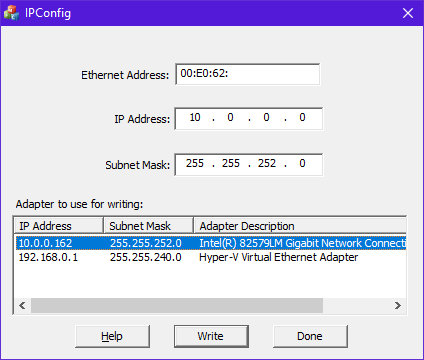
A: It can be changed using IPX protocol:
NetEdit FAQ0023
03-Oct-2005
Q: In the General Help window there are strange characters
("garbage" text).
A: This is a bug in some earlier versions of NetEdit3.
Upgrading to the latest version will take care of this.
NetEdit FAQ0024 (see also ECOM FAQ0060)
14-Dec-2004
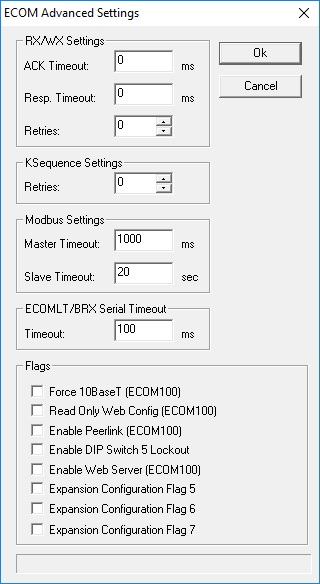
Q: Using NetEdit with ECOM/ECOM100; in the Advanced Settings, what
is the difference between "RX/WX Settings - Retries" and "KSequence
Settings - Retries"?
A: "RX/WX Settings - Retries" is the number of times the
ECOM/ECOM100 will attempt a comm over the network for an ECOM-to-ECOM
(Peer-to-Peer) communication.
"KSequence Settings - Retries" is the number of times the ECOM/ECOM100 will attempt a comm over the backplane to the DL-PLC.
NetEdit FAQ0025 (see also ECOM FAQ0062)
15-Mar-2005
Q: When using the ECOM100 as a Modbus TCP Client (Master) with the
RX/WX instructions reading/writing to a Modbus TCP Server (Slave;
e.g. ProSoft Technology module for Allen-Bradley PLC), keep getting
timeout errors.
A: This could be caused by one or both of the following issues:
NetEdit FAQ0026 (see also DirectSOFT FAQ0197;
ECOM FAQ0082)
29-Aug-2006
Q: When using NetEdit v3.6b (or earlier), the ECOM/ECOM100 won't
pass the CPU Test, but I can still make and use a link from
DirectSOFT.
A: This was caused by NetEdit v3.6b (and earlier) using a slightly
different method to test for CPU than DirectSOFT. This was fixed in:
NetEdit 3.6c (and later)
NetEdit FAQ0027 (see also ECOM FAQ0083)
20-Dec-2006
Q: If my Modbus TCP client (i.e. master) does not talk to the
ECOM100 faster than 5 seconds, the ECOM100 closes the TCP connection
and I have to open up another one.
A: This is a problem with the firmware in the ECOM100. In earlier
versions of the firmware the ECOM100 had a Modbus TCP server (i.e.
slave) timeout value fixed at 5 seconds. This, however, was changed
with:
H0-ECOM100 v4.0.154 (or later)
H2-ECOM100 v4.0.1185 (or later)
H4-ECOM100 v4.0.1185 (or later)
With these later versions the default Modbus TCP Slave Timeout value is 20 seconds. But also, NetEdit was changed to allow this timeout to be adjusted to whatever you want. This feature was added to:
NetEdit 3.6d
NetEdit FAQ0028 (see also EBC FAQ0091; ECOM FAQ0085; EDRV FAQ0031)
29-Oct-2013
Q: My ECOM100/EDRV100/EBC100 disappears from NetEdit using TCP/IP
protocol if I accidentally give it a bogus IP address, or gateway
address, or subnet mask.
A: This has not been a serious problem until the advent of
WinVista. The reason being that you normally could switch to IPX in
NetEdit and find the Ethernet device and then fix the mistake.
However, with the advent of WinVista, IPX is no longer available.
Thus, the following changes were made to the
ECOM100, EDRV100 & EBC100 firmware and NetEdit to alleviate
this issue:
These fixes are in:
H2-EBC100 v4.0.490 (or later) NetEdit FAQ0029 (see also ECOM FAQ0086)
09-Mar-2006
Q: Is it possible to test the e-mail function and configuration of
the ECOM100 using NetEdit?
A: Yes, this feature is available with:
H0-ECOM100 v4.0.167 (or later)
H2-ECOM100 v4.0.1237 (or later)
H4-ECOM100 v4.0.1237 (or later)
NetEdit v3.7
It is on the right-click menu in NetEdit (or on the ECOM Settings tab under Utils along with the Test CPU Access).
NetEdit FAQ0030 (see also EBC FAQ0075)
18-Nov-2008
Q: What are the meanings of the Port Mode settings for the
EBC/EBC100 that are seen in Serial Port Settings of NetEdit?
A: The functionality and description of these modes are not
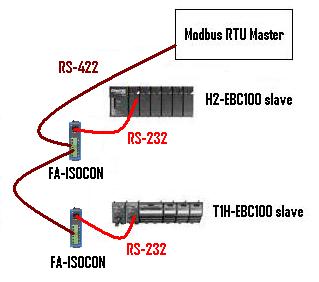
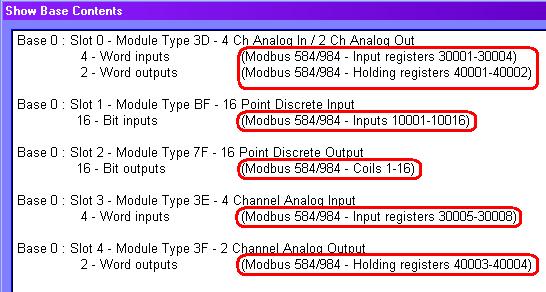
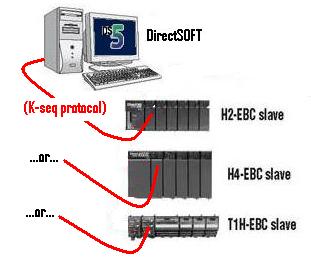
documented anywhere simply because there are no products that fully
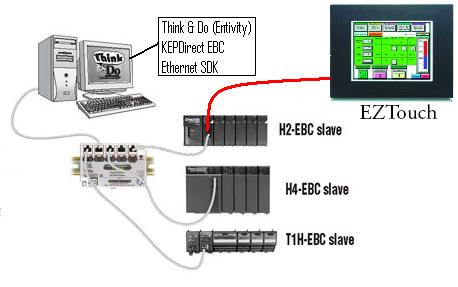
utilize them. Basically the EBC has 2 Port Modes (Master/Proxy; K-Seq
Slave) and the EBC100 has an extra 3rd one (Modbus Slave). These modes
are briefly described here:
NetEdit FAQ0031 (see also PSCM FAQ0002)
10-Apr-2007
Q: How do I update the firmware or booter for my H0-PSCM module?
A: On the top of the H0-PSCM module there is an RS232C RJ12
serial port connector. It can be accessed by opening the little door
for that slot in the DL05 or DL06. The port is identical to an RJ12
serial port on the DL PLCs. To perform the update:
NetEdit FAQ0032 (see also EBC FAQ0076;
ECOM FAQ0092; EDRV FAQ0023; ERM FAQ0050; )
23-May-2007
Q: Can firmware upgrades be performed over a remote network (e.g.
over the Internet)?
A: Not normally, no. The reason is because NetEdit must be able
to see the Host Ethernet device in his list. The list is compiled by
NetEdit sending out a broadcast and having all the Host Ethernet
devices respond. Since the Internet will block all broadcasting, then
the list will always be blank. However, it is possible to configure a
VPN (Virtual Private Network) between the locations and configure the
VPN in such a way as to allow broadcasting.
NetEdit FAQ0033
10-Jul-2018
Q: What Windows operating systems does NetEdit work with?
A: See the following chart:
| NetEdit Versions |
Windows Operating Systems | |||||||||||||
| Win3.11 | Win95 | Win98 | WinME | WinNT4 | Win2K | WinXP | WinXP64 | WinVista | WinVista64 | Win7 | Win7-64 | Win8 (2)(3) | Win10 | |
| v3.1 | Y | Y | Y | Y | Y | (1) | Y | (1) | Y | Y | Y | Y | ||
| v3.2 | Y | Y | Y | Y | Y | (1) | Y | (1) | Y | Y | (1) | (1) | ||
| v3.2a | Y | Y | Y | Y | Y | (1) | Y | (1) | Y | Y | (1) | (1) | ||
| v3.4 | Y | Y | Y | Y | Y | (1) | Y | (1) | Y | Y | Y | Y | ||
| v3.5 | Y | Y | Y | Y | Y | (1) | Y | (1) | Y | Y | (1) | (1) | ||
| v3.5a | Y | Y | Y | Y | Y | (1) | Y | (1) | Y | Y | (1) | (1) | ||
| v3.6 | Y | Y | Y | Y | Y | (1) | Y | (1) | Y | Y | (1) | (1) | ||
| v3.6b | Y | Y | Y | Y | Y | (1) | Y | (1) | Y | Y | (1) | (1) | ||
| v3.6c | Y | Y | Y | Y | Y | (1) | Y | (1) | Y | Y | (1) | (1) | ||
| v3.6d | Y | Y | Y | Y | Y | (1) | Y | (1) | Y | Y | (1) |
(1) | ||
| v3.7 | Y | Y | Y | Y | Y | (1) | Y | (1) | Y | Y | Y | Y | ||
| v3.7a | Y | Y | Y | Y | Y | (1) | Y | (1) | Y | Y | Y | Y | ||
| v3.7b | Y | Y | Y | Y | Y | (1) | Y | (1) | Y | Y | Y | Y | ||
| v3.7c | Y | Y | Y | Y | Y | (1) | Y | (1) | Y | Y | Y | Y | ||
| v3.8 | Y | Y | Y | Y | Y | (1) | Y | (1) | Y | Y | Y | Y | ||
| v3.8a | Y | Y | Y | Y | Y | (1) | Y | (1) | Y | Y | Y | Y | ||
| v3.10 | (1) | (1) | (1) | (1) | Y | (1) | Y | (1) | Y | Y | (1) | (1) | ||
| v3.12 | (1) | (1) | (1) | (1) | Y | (1) | (1) | (1) | Y | Y | (1) | (1) | ||
| v3.13 | (1) | (1) | (1) | (1) | Y | (1) | (1) | (1) | Y | Y | (1) | Y | ||
| v3.14a | (1) | (1) | (1) | (1) | Y | (1) | (1) | (1) | Y | Y | (1) | Y | ||
| v3.14c | (1) | (1) | (1) | (1) | Y | (1) | (1) | (1) | Y | Y | (1) | Y | ||
| v3.16 | (1) | (1) | (1) | (1) | Y | (1) | (1) | (1) | Y | Y | (1) | Y | ||
NOTES:
(1) - Have
not tested officially but probably will work.
(2)
- Both 32-bit and 64-bit versions work.
(3) - Win8-RT
version not supported.
NetEdit FAQ0034 (see also EBC FAQ0077;
ECOM FAQ0102; ERM FAQ0051; SDK FAQ0019)
24-Jul-2013
Q: How can I enable the "fast response mode" of the T1F-08AD-1 or
T1F-08AD-2?
A: The fast response mode of these devices is activated by a
write to a special location in the T1H-EBC or T1H-EBC100 called Config
Data. This area of memory is not available to the ERM nor NetEdit and
therefore cannot be configured with ERM
Workbench, nor NetEdit.
If using T1H-EBC:
- Currently, the only way to write to the Config Data of the T1H-EBC
is to use the Ethernet SDK routine HEIWriteConfigData. The Ethernet
SDK is free and downloadable from
http://www.hosteng.com/Ethernet_SDK.htm.
If using T1H-EBC100:
- Currently, there are 2 ways to write to the Config Data of the
T1H-EBC100:
(1) Use the Ethernet SDK routin
HEIWriteConfigData. The Ethernet SDK is free and downloadable from
http://www.hosteng.com/Ethernet_SDK.htm.
(2) Use Modbus TCP. The Config Data is mapped
into the Modbus TCP memory range 50021-50052 (or 410021-410052 for
6-digit addressing). This range is 32 words (1 word for each slot).
The bits of the word are defined as follows for the analog input
cards:
Bits 0-4: 0 = All channels enabled; 1-31 = Number of channels enabled starting with channel 1
Bits 5-6: Reserved
Bit 7: 0 = Normal response; 1 = Fast response
Bits 8-15: Reserved
NetEdit FAQ0035 (see also ECOM FAQ0107)
24-May-2010
Q: Is there any way to protect the HTML configuration on the
ECOM100 to make it Read only (Write protected)?
A: Yes. This capability was added to the following firmware:
NOTE: This feature cannot be changed with the HTML editor. The setting can only be configured with NetEdit v3.7c (or later).
NetEdit FAQ0036 (see also ECOM FAQ0108)
24-May-2010
Q: Is there any way to force the ECOM100 to use 10 Mbps transmission
rate instead of the 100 Mbps?
A: Yes. This capability was added to the following firmware:
NOTE: This feature cannot be changed with the HTML editor. The setting can only be configured with NetEdit v3.7c (or later).
NetEdit FAQ0037 (see also CTRIO FAQ0045;
DirectSOFT FAQ0132; DL Plus FAQ0010; DNLoader FAQ0011; DS Data
FAQ0102; EBC FAQ0083; ECOM FAQ0084; EDRV FAQ0084; ERM FAQ0058; EZ
Ethernet FAQ0010; General FAQ0004; HA-TADP FAQ0008; Lookout Direct
FAQ0015; PBC FAQ0014; PSCM FAQ0003; SDK FAQ0022; SERIO FAQ0004; WinPLC
FAQ0038)
31-Dec-2009
Q: What is the export classification of your products (e.g. ECCN)
A: None of our products have an ECCN. Automation Direct sells our
products and they export EAR99 NLR (No License Required). ECCN
is Export Controlled Classification Number and none of our
products are controlled.
NetEdit FAQ0038 (see also ECOM FAQ0100)
03-May-2010
Q: Can the ECOM100 send e-mail via my public ISP account (e.g.
Gmail, Juno, AOL, Charter, etc.)?
A: Most of the time this will not work, mainly due to the ISP's
security measures and the fact that many web-based e-mail services are
not able to be accessed via SMTP protocol.
Basically, the ECOM100 was not designed to send e-mail in this fashion, but rather, was designed to send e-mail to an e-mail server on its own local area network. However, if you do not have a local area network e-mail server available then:
The 1st thing to try is:
(1) Put a PC on the ECOM100's local
network.
(2) See if you can setup your PC's e-mail
(e.g. Microsoft Outlook) to get e-mail from your 3rd-party ISP.
Your IT personnel will have to help you with this; as Host
Engineering nor the techs at Automation Direct can help you with
this.
(3) If you and your IT personnel can read
e-mail from your 3rd-party ISP this indicates you have at least an open
channel to your ISP's e-mail server.
(4) Attempt to send
an e-mail using this PC's setup. This is vitally important.
If the PC's e-mail send does not work, then you will not be able to get the ECOM100 to do it either.
If, however, the PC's e-mail send
works using the 3rd-party ISP setup, then there is a slight chance you
can get the ECOM100's e-mail send to work by:
(1) Using the same Server IP Address
setting on the ECOM100 as was used in your PC's setup.
(2) Using the same Sender EMail
Address setting on the ECOM100 as was used in your PC's setup.
(3) Using the same SMTP Port
number on the ECOM100 as was used in your PC's setup.
(4) Using the same Authentication
Username and Password on the ECOM100 as was used in your
PC's setup.
NOTE: The ECOM100's e-mail Authentication setup is currently only configurable via the HTML setup page of the ECOM100 (i.e. use a web browser like Internet Explorer, Chrome, Mozilla, etc. and type in the IP address of the ECOM100 to access). Also, another show-stopper is the fact that the ECOM100 only uses one form of e-mail authentication whereas your ISP may use something different.
So, the odds of getting this to work are very slim, but it is sometimes possible.
NetEdit FAQ0039 (see also ECOM FAQ0110;
DirectSOFT FAQ0176)
06-May-2010
Q: When setting up E-mail for the ECOM100, is it necessary that the
SMTP Server IP Address be a "name" instead of a static IP?
A: No, this is not possible. This would require that the ECOM100
support the DNS protocol, which it doesn't. Instead the ECOM100 was
designed to send e-mail to an e-mail server on its own LAN which
normally has a static IP address.
If all you have is a name to work with, then you can find the static IP by doing the following:
Replace, <name> with your e-mail server's DNS name. When this is executed, you will see something like:
Pinging <name> [<IP Address>] with 32 bytes of data:
Reply from <IP Address>: bytes=32 time=205ms TTL=55
Reply from <IP Address>: bytes=32 time=254ms TTL=55
Reply from <IP Address>: bytes=32 time=215ms TTL=55
Reply from <IP Address>: bytes=32 time=266ms TTL=55
Ping statistics for <IP Address>:
Packets: Sent = 4, Received = 4, Lost = 0 (0% loss),
Approximate round trip times in milli-seconds:
Minimum = 205ms, Maximum = 266ms, Average = 235ms
The IP address contained in the brackets after the server's DNS name is the static IP of your e-mail server.
NetEdit FAQ0040 (see also ECOM FAQ0114, EBC
FAQ0086, EDRV FAQ0029, ERM FAQ0060, EZEthernet FAQ0032)
11-Feb-2011
Q: What do the Ethernet Stats at the bottom of NetEdit
specifically mean?
A: These are stats that are reported up to the firmware from
the hardware communication components. They are technically defined
as:
Missed Fr - "Missed Frames" - A count of the packets missed due to overruns, unavailable buffers or a disabled receiver.
TX Coll - "Transmit Collisions" - A count of the packets which had a late collision while being received.
Lost Pkts - "Lost Packets" - A count of the packets discarded because they were too long or too short.
Bad Pkts - "Bad Packets" - A count of the packets which have bad CRCs (checksums).
Unknown - A count of the packets which contain invalid symbols, extra bits or resulted in a receiver overrun condition.
TX Errors - "Transmit Errors" - A count of the packets which could not be sent because the transmitter was unavailable for an extended period of time.
ECOMLT/BRX Serial Timeout